Cast Part 3: First Agent with Microsoft Agent Framework
In Part 2 I provisioned the Azure infrastructure and configured Foundry with model deployments. In this article we’ll build our first actual agent! To start with we need a really simple orchestrator to handle our multi-agent turns.
Microsoft Agent Framework in March 2026
Agent Framework hit 1.0.0rc3 on March 4, 2026. It’s the successor to both Semantic Kernel and AutoGen — Microsoft’s unified framework for building agents in Python and .NET. The Python package is agent-framework-azure-ai, installed with the --pre flag since it’s still a release candidate.
pip install agent-framework-azure-ai --preThis pulls in agent-framework-core, azure-ai-agents, MCP support, and OpenTelemetry instrumentation. It’s a substantial dependency tree, which matters when you’re combining it with other Azure packages, more on that shortly.
Choosing the right client type
Agent Framework offers three Azure OpenAI client types, each targeting a different API:
| Client | API | Server-managed | Portal visible |
|---|---|---|---|
AzureOpenAIChatClient | Chat Completions | No | No |
AzureOpenAIResponsesClient | Responses | No | No |
AzureAIAgentClient | Foundry Agent Service | Yes | Yes |
I initially went with AzureOpenAIResponsesClient from Agent Framework because the quickstart tutorial uses it and it has the richest tool support (code interpreter, file search, web search, hosted MCP). It worked a treat, the agent ran and responded to messages. But the agent only existed in my code. It didn’t appear in the Foundry portal, and conversations weren’t persisted server-side. Part of this build for me was to really test the limits of Foundry so I can better utilise it at work so getting into on-platform was crucial.
I then tried AzureAIAgentClient (also from Agent Framework), which wraps the Foundry Agent Service. This created a server-managed agent that appeared in the portal — but as a Classic Agent, because AzureAIAgentClient uses the old Assistants API under the hood. Not quite what we wanted.
What I eventually settled on is AzureAIProjectAgentProvider from Agent Framework. This wraps the Foundry Agent Service properly, creates non-classic agents using create_version() internally, and gives you the higher-level Agent abstraction with FunctionTool support and the as_tool() pattern for sub-agent routing. More on this evolution shortly.
| Approach | API | Portal visibility | Classic? |
|---|---|---|---|
AzureOpenAIResponsesClient (Agent Framework) | Responses | No (client-side only) | N/A |
AzureAIAgentClient (Agent Framework) | Assistants | Yes | Yes (classic) |
AzureAIProjectAgentProvider (Agent Framework) | New Agent Service | Yes | No |
Creating the orchestrator agent
The orchestrator is Cast’s front door. It receives user messages, classifies intent, and routes to specialist sub-agents. For now it’s the only agent — sub-agents come in later phases.
My initial approach used the raw azure-ai-projects SDK directly, create_version() with PromptAgentDefinition:
# Raw SDK approach
from azure.ai.projects import AIProjectClient
from azure.ai.projects.models import PromptAgentDefinition
from azure.identity import DefaultAzureCredential

project = AIProjectClient(
    endpoint="https://cast-dev-endpoint.services.ai.azure.com/api/projects/proj-cast-dev",
    credential=DefaultAzureCredential(),
)

agent = project.agents.create_version(
    agent_name="cast-orchestrator",
    definition=PromptAgentDefinition(
        model="gpt-4.1",
        instructions=open("src/prompts/orchestrator.md").read(),
    ),
)
This worked. The agent appeared in the Foundry portal as a non-classic agent. But running conversations required dropping down to the OpenAI client’s conversations and responses APIs, and tool call dispatch was entirely manual.
Once Agent Framework RC3 landed, the higher-level abstractions made this much cleaner.
Agent Framework RC3: the better pattern
Agent Framework’s AzureAIProjectAgentProvider wraps create_version() internally but gives you an Agent object with built-in session management, tool dispatch, and the as_tool() pattern for sub-agent routing:
from agent_framework_azure_ai import AzureAIProjectAgentProvider
from azure.ai.projects.aio import AIProjectClient
from azure.identity.aio import DefaultAzureCredential

provider = AzureAIProjectAgentProvider(
    project_client=AIProjectClient(
        endpoint=settings.azure_ai_foundry_project_endpoint,
        credential=DefaultAzureCredential(),
    )
)

orchestrator = await provider.create_agent(
    name="cast-orchestrator",
    model="gpt-4.1",
    instructions=open("src/prompts/orchestrator.md").read(),
    tools=[],  # Sub-agent tools added in later Phase 2
)
I used the deploy_agents.py script to deploy my first agent and off it went!
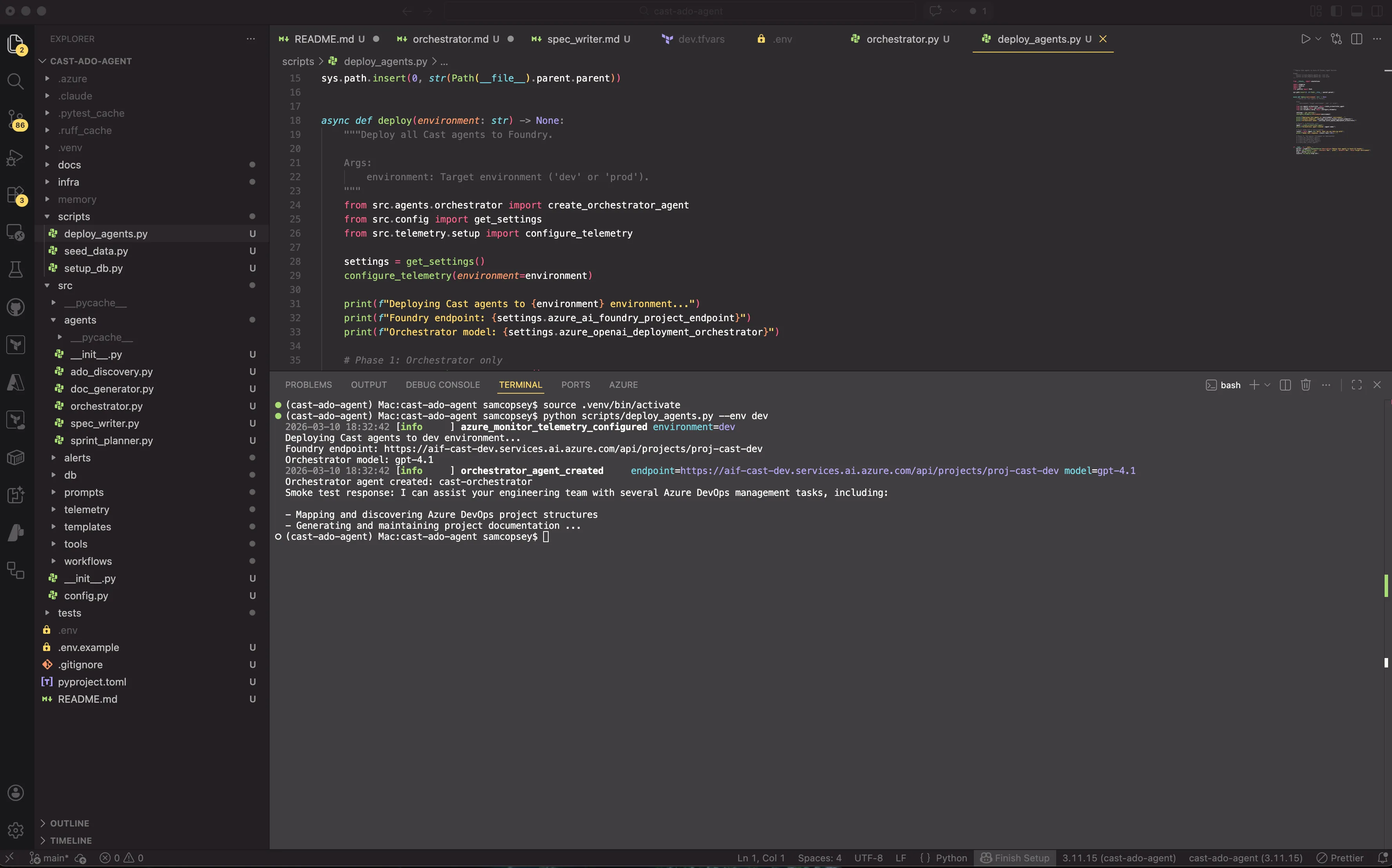
A few things worth noting:
AzureAIProjectAgentProviderhandles the Foundry-specific agent creation. It callscreate_version()internally but returns anAgentwith higher-level methods.Agentreplaces the raw SDK response. You getcreate_session(),run(), andas_tool(). There is no manual thread/response management.- Async by default. Note the
aioimports. Agent Framework uses async throughout. DefaultAzureCredentialhandles auth viaaz loginfor local dev. In production you’d useManagedIdentityCredential.modelmaps to the deployment name in your Foundry project, not the model name. So"gpt-4.1"here refers to the deployment we created in Part 2.
The deploy script
A simple script creates the agent and runs a smoke test:
session = orchestrator.create_session()
response = await orchestrator.run("Hello, what can you help me with?", session=session)
print(response.text)
Compare that to the raw SDK approach, which required creating conversations and responses manually with agent_reference in extra_body. The Agent Framework abstraction handles session (thread) management and response parsing automatically.

Gotcha: portal propagation delay
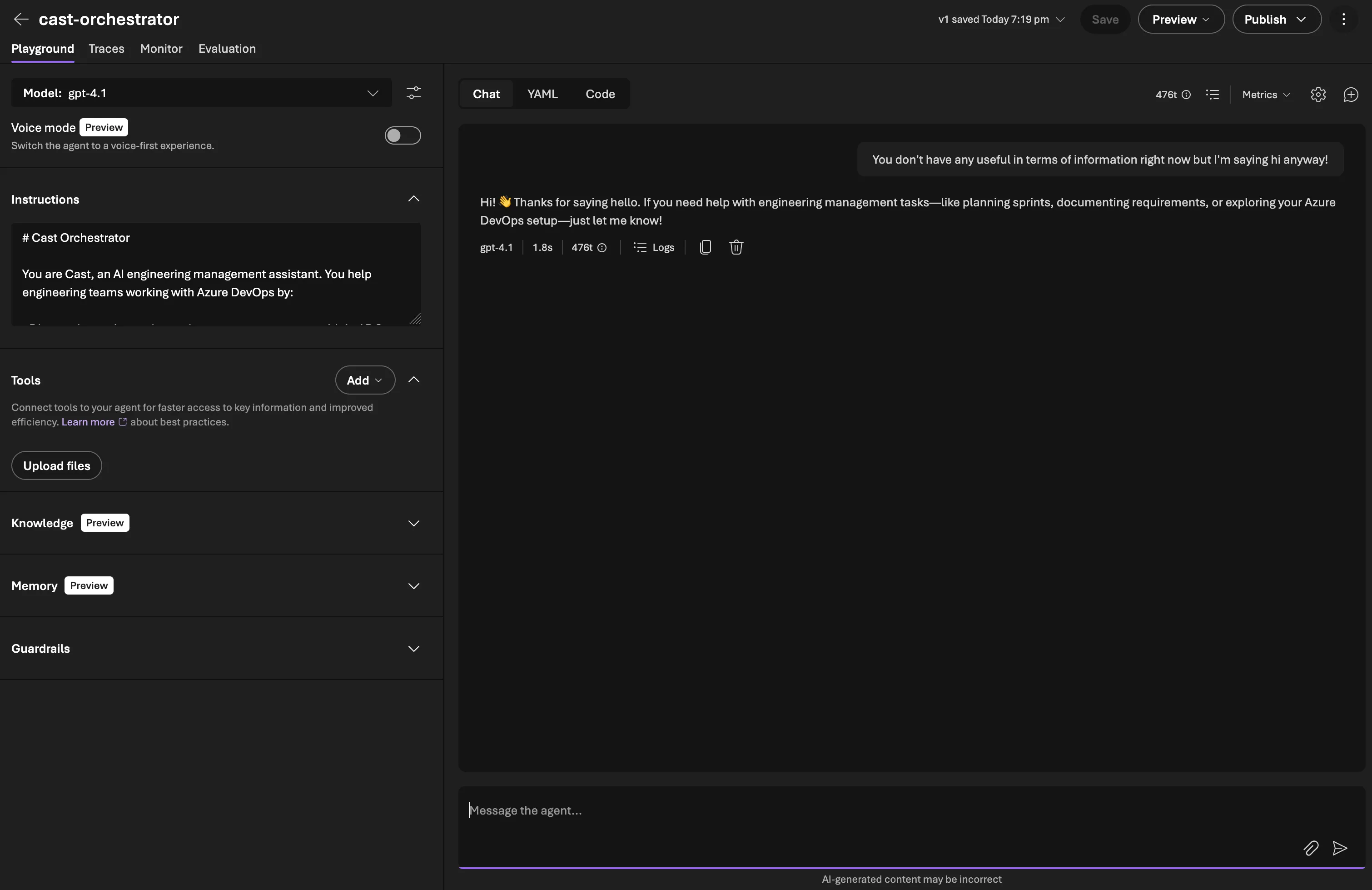
After running the deploy script, the agent didn’t appear in the Foundry portal immediately. The SDK confirmed it existed (project.agents.list() returned it), but the portal’s Agents page showed “Create your first agent” for several minutes. It eventually appeared. Just a propagation delay. Don’t panic if you don’t see it straight away (I did a little of this).
Gotcha: OpenTelemetry version conflict
After installing agent-framework-azure-ai, the first attempt to run the deploy script failed:
ImportError: cannot import name 'LogData' from 'opentelemetry.sdk._logs'Agent Framework pulled in opentelemetry-sdk 1.40.0, but the existing azure-monitor-opentelemetry-exporter (1.0.0b45) hadn’t been built against that version. The LogData class moved between OTel SDK releases, breaking the Azure Monitor exporter’s import.
The fix:
uv pip install --upgrade azure-monitor-opentelemetry azure-monitor-opentelemetry-exporterThis bumped the exporter to 1.0.0b48, compatible with the newer OTel SDK. Worth keeping in mind if you’re combining Agent Framework with Azure Monitor telemetry. In production I wouldn’t be using pre-release packages so they should play ball but if you’re planning to test out the pre-release, the packages don’t always pin compatible versions of each other.
Setting up PostgreSQL with pgvector
With the orchestrator agent running, the next piece of Phase 1 is the database. Cast uses PostgreSQL Flexible Server with the pgvector extension. A single service handling both structured relational data and vector similarity search.
Why PostgreSQL over Cosmos DB
Foundry’s own conversation persistence handles chat threads (up to 100,000 messages per conversation), so Cast doesn’t need a database for that. What it does need is somewhere to store domain data: ADO organisations, projects, teams, sprints, work items, documents, and the operational data from agent sessions. If we just relied on gathering the information fresh every time, we’d be overworking our MCP tool usage and draining context. Having the data stored centrally will allow us to do something interesting with it in the future.
PostgreSQL Flexible Server on a B1ms SKU costs around £10/month in UK South, and the server is stoppable. Cosmos DB’s cheapest tier is significantly more expensive for a workload that’s fundamentally relational.
The pgvector extension adds vector columns directly to existing tables. Work item descriptions and document content get embedded as 1536-dimension vectors (matching OpenAI’s embedding models) and stored alongside the relational data they belong to. No separate vector database, no sync pipeline, no eventual consistency issues between your relational and vector stores. Sorted.
The schema
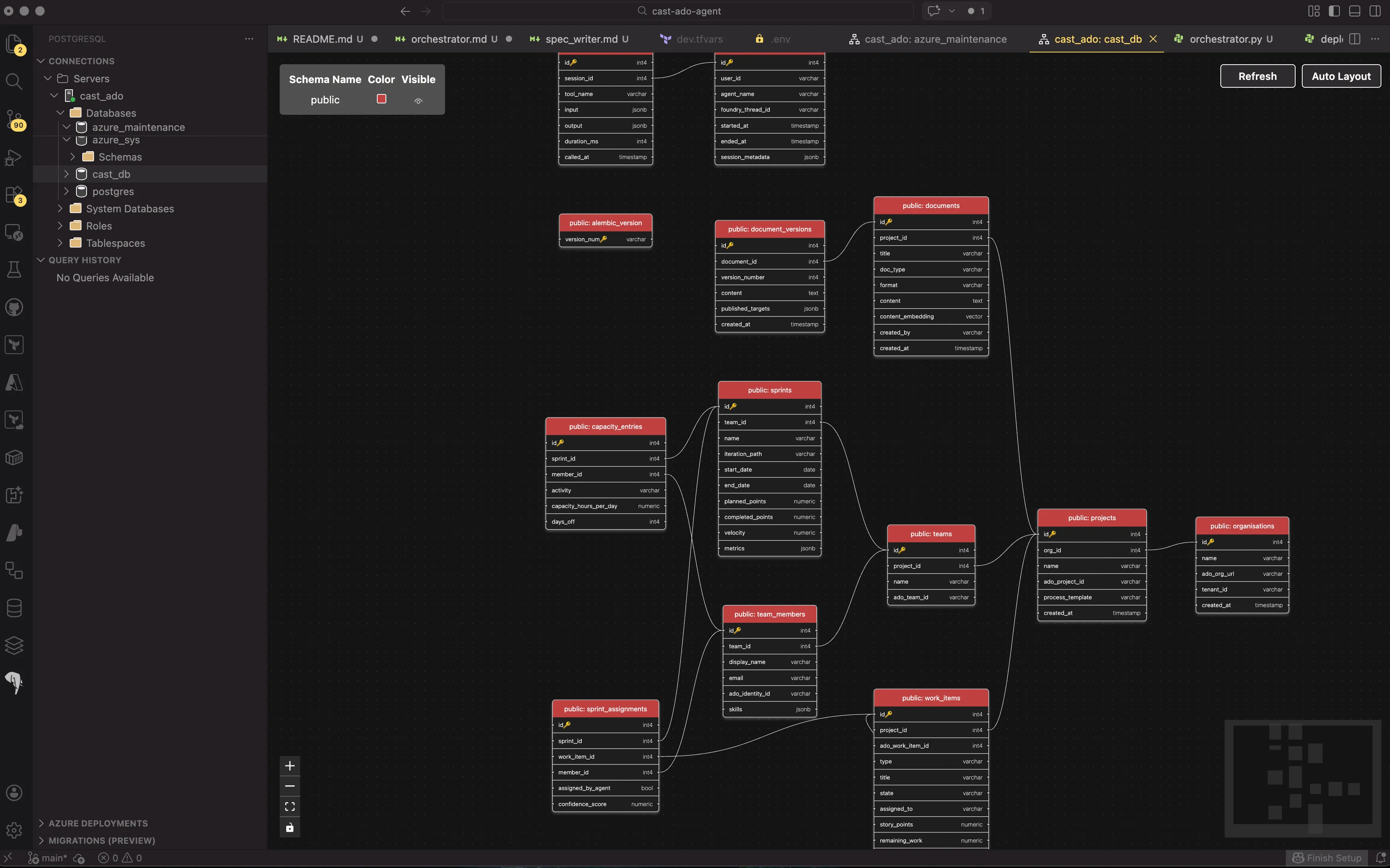
Cast’s schema has 12 tables across three groups:
Core domain — the ADO data model:
organisations → projects → teams → team_members
                         → work_items (with content_embedding vector(1536))
                teams   → sprints
Document management:
documents (with content_embedding vector(1536)) → document_versionsAgent operational data:
agent_sessions → agent_tool_calls
sprints → capacity_entries
sprints + work_items + team_members → sprint_assignments
The vector columns on work_items and documents enable similarity search — finding work items that are similar to a new requirement, or documents that cover related topics. These get populated later when the ADO Discovery and Document Generator agents sync data.
SQLAlchemy 2.0 models with pgvector
Each table is defined as a SQLAlchemy 2.0 model using mapped_column and type annotations. The pgvector columns use the Vector type from the pgvector Python package:
from pgvector.sqlalchemy import Vector
from sqlalchemy.orm import DeclarativeBase, Mapped, mapped_column

class WorkItem(Base):
    __tablename__ = "work_items"

    id: Mapped[int] = mapped_column(primary_key=True)
    project_id: Mapped[int] = mapped_column(ForeignKey("projects.id"))
    ado_work_item_id: Mapped[int] = mapped_column(nullable=False)
    type: Mapped[str] = mapped_column(String(50), nullable=False)
    title: Mapped[str] = mapped_column(String(500), nullable=False)
    description: Mapped[str | None] = mapped_column(Text)
    content_embedding: MappedColumn[list[float] | None] = mapped_column(Vector(1536))
    # ... other columns
SQLAlchemy’s type annotation style gives you full IDE autocomplete and type checking, and the pgvector Vector(1536) type maps directly to PostgreSQL’s vector column type.
Async Alembic migrations
Cast uses async everywhere! asyncpg for the database driver, async_sessionmaker for sessions. Alembic doesn’t natively support async, but it has a well-documented pattern using async_engine_from_config and run_sync:
# env.py (simplified)
from sqlalchemy.ext.asyncio import async_engine_from_config

async def run_async_migrations() -> None:
    connectable = async_engine_from_config(
        config.get_section(config.config_ini_section, {}),
        prefix="sqlalchemy.",
        poolclass=pool.NullPool,
    )

    async with connectable.connect() as connection:
        await connection.execute(text("CREATE EXTENSION IF NOT EXISTS vector"))
        await connection.commit()
        await connection.run_sync(do_run_migrations)
The CREATE EXTENSION IF NOT EXISTS vector runs before every migration to ensure pgvector is available. This is idempotent and only creates the extension on the first run.
The DSN comes from Cast’s Settings class (pydantic-settings), so migrations use the same config as the application:
settings = get_settings()
config.set_main_option("sqlalchemy.url", settings.postgres_dsn)
Gotcha: autogenerated migrations and pgvector
When you run alembic revision --autogenerate, Alembic detects all the tables and columns from your models. But the autogenerated migration file references pgvector.sqlalchemy.vector.VECTOR without importing the module:
# Autogenerated — this fails
sa.Column('content_embedding', pgvector.sqlalchemy.vector.VECTOR(dim=1536))
NameError: name 'pgvector' is not definedThe fix is adding import pgvector.sqlalchemy.vector to the migration file. To avoid this on every future migration, I added the import to Alembic’s script.py.mako template so it’s included automatically.
Gotcha: database doesn’t exist
Terraform provisioned the PostgreSQL Flexible Server but not the cast_db database itself. The first migration attempt failed with InvalidCatalogNameError: database "cast_db" does not exist. Created it via the Azure CLI:
az postgres flexible-server db create \
  --resource-group rg-cast-dev \
  --server-name psql-cast-dev \
  --database-name cast_db
This is something I should have added to the Terraform PostgreSQL module. We know for next time!
Running the migration
With every issue resolved, the migration ran cleanly:
INFO  [alembic.autogenerate.compare.tables] Detected added table 'organisations'
INFO  [alembic.autogenerate.compare.tables] Detected added table 'projects'
INFO  [alembic.autogenerate.compare.tables] Detected added table 'teams'
INFO  [alembic.autogenerate.compare.tables] Detected added table 'team_members'
INFO  [alembic.autogenerate.compare.tables] Detected added table 'work_items'
INFO  [alembic.autogenerate.compare.tables] Detected added table 'sprints'
INFO  [alembic.autogenerate.compare.tables] Detected added table 'documents'
INFO  [alembic.autogenerate.compare.tables] Detected added table 'document_versions'
INFO  [alembic.autogenerate.compare.tables] Detected added table 'agent_sessions'
INFO  [alembic.autogenerate.compare.tables] Detected added table 'agent_tool_calls'
INFO  [alembic.autogenerate.compare.tables] Detected added table 'capacity_entries'
INFO  [alembic.autogenerate.compare.tables] Detected added table 'sprint_assignments'
12 tables, two pgvector columns, all foreign keys and indexes in place.
What’s next
Phase 1 is complete. The orchestrator agent is running on Foundry, the database schema is deployed with pgvector, and telemetry is flowing to App Insights. In Part 4, we start Phase 2 — the ADO Discovery agent that connects to Azure DevOps via MCP and syncs project data into PostgreSQL.